Reducing Operational Complexity in Enterprise Workflows - AI Enabled

Business Objective
As the system scaled, admins repeated multi-step tasks across 1000+ employees, slowing operations, increasing errors, and driving up huge costs.
Core Problem
Within the Employee Management System, the lack of a unified workflow forced admins to repeat 5–7 step actions for each employee, resulting in thousands of daily interactions across 1000+ employees.
This operational inefficiency increased processing time, elevated the risk of execution errors, and reduced visibility into task completion status. As a result, teams faced lower productivity, higher coordination overhead, and limited operational scalability in high-volume environments.
Admins repeat the same 5–7 step workflow for 1,000+ employees


User Journey of Rakesh Persona
Key Strategy
Instead of optimizing individual screens, I defined a workflow simplification strategy focused on restructuring high-frequency administrative tasks into a unified, step-based model.
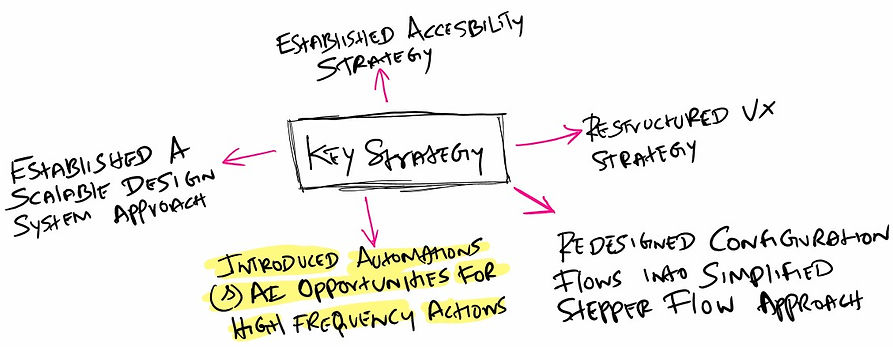
Redefined Workflow Architecture
From a strategic standpoint, we explored three solution directions to address onboarding complexity and scalability. These included
Guided workflows, Template-based configuration, and a Work allocation–driven system.
Solution 1
Guided Workflow (Step by Step)
Idea : A guided workflow leads users step-by-step, reducing effort and decision-making.

Pros
-
Massive cognitive load reduction
-
Faster onboarding
-
Low Learning Curve
Cons
-
Less Flexibility for advance users
-
Can feel restrictive, If customization needed
-
Limits fliexibility for advanced configurations
Solution 2
Role-Based Configurations
Idea : Template-based configuration standardizes setup by applying predefined configurations, reducing repetitive effort.

Pros
-
Reduces repetitive effort by reusing predefined setups
-
Ensures consistency across employees
-
Scale extremely well for large organisations
Cons
-
High upfront setup effort to define roles
-
Becomes outdated quickly if org structure changes
-
Limited flexibility for edge cases or unique roles
Solution 3
Work Allocation–Driven Model
Idea : Don’t onboard users. Onboard work.

Pros
-
Eliminates Configuration Overhead
-
Reduces Errors & Misconfiguration
-
Faster Time-to-Productivity
Cons
-
High Initial System Complexity
-
Difficult to Handle Edge Cases
-
Reduced Direct Control for Admins
Decision
We adopted a hybrid approach to balance automation with control, taking into account engineering feasibility, AI maturity, and client expectations. AI assists by recommending roles based on input data, while critical configurations such as work centers, screens, and permissions are handled through rule-based automation to ensure accuracy and reliability.
This approach mitigates the risk of incorrect AI suggestions while still reducing manual effort. At the same time, it allows admins to review and adjust configurations before finalizing, ensuring both efficiency and trust in the system.
Dashboard approach to bring all data into a single, unified design
We consolidated fragmented data and actions into one centralized dashboard, enabling admins to view key information, track progress, and take actions from a single place—reducing navigation effort, improving visibility, and supporting faster, more confident decision-making at scale.

Key Decisions
To streamline complex admin workflows by centralizing operations, reducing manual effort through automation, and enabling faster, more accurate, and scalable decision-making.
-
Chose unified & Centralized Dashboard system for admin profile.
-
Insights about each employee details, Performance, Attendance, Task status and single/Bulk employee onboarding .
-
Implemented Rule based automations with AI assistance like one/multiple onboarding, Notifications, Status updates, Approval routing, Data validation & Error handling.
-
Added role configuration for assigning screens, permissions, workcenters to roles.
-
Analyze and track production issues, Production trends, notifications.
-
Defined system configuration rules to control how the system operates.
Dashboard - Wireframe created using Figma Make

Design system

To ensure the redesigned system delivered clarity, consistency, and long-term scalability, I built a modular design system grounded in Atomic Design principles. This allowed me to break down the interface into reusable building blocks—Atoms, Molecules, Organisms, Templates, and Pages—while aligning with the company’s existing brand guidelines.
I focused on standardised critical interface elements such as buttons, input fields, table structures, navigation patterns, spacing rules, typography scales, and colour tokens. For developers, the shared component library significantly reduced ambiguity, accelerated implementation time, and improved cross-team collaboration.
Click Image to view Design system case study.
Before & After design
Before

After

Impact
Transforming a fragmented, multi-step onboarding process into a unified, AI-assisted workflow significantly improved speed, usability, and operational reliability.
-
Pilot users completed employee onboarding tasks 90% faster compared to the legacy system—validated through task-based testing.
-
90% of users found the onboarding flow significantly easier, with major friction points like repeated data entry and manual configuration eliminated.
-
The optimized onboarding experience is projected to save 1000+ hours annually, while reducing errors and lowering training effort.

